Here is the new CMS Manager management panel
Team Host.it 4 min read
Content
SEARCH FOR UPDATES Within the CMS Manager Control Panel, we have implemented the SEARCH FOR UPDATES button which allows you to launch an on-demand scan by the component to search for available updates for all your Joomla! sites. in which you have installed the CMS Manager.
Furthermore, you can easily decide which sites to search for updates on, thanks to the new filter system implemented in the summary table of your Joomla! sites. managed with the CMS Manager. Thanks to the filters you will be able to perform a quicker search by: Version (the Joomla! version of your site), Site Name and Site URL.
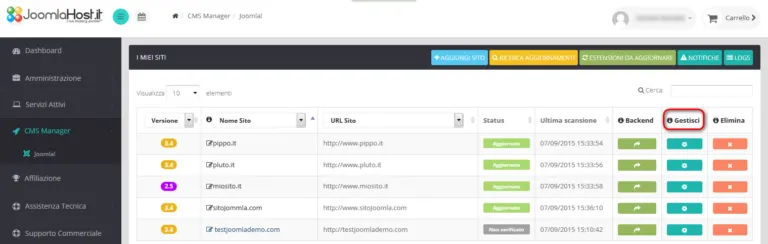
CMS Manager - Search Filters Update MANAGE COLUMN The MANAGE column has also been implemented within the summary table which allows you to manage various functions at site level:
CMS Manager - Manage Column By clicking on the MANAGE button for a single site, you can manage the following options:
Generic CMS Manager settings
Extensions management of the single selected site
Backup management of the selected site
CMS Manager Manage EDIT CMS MANAGER SETTINGS In this section it is possible to modify some of the settings regarding the CMS Manager relating to the selected site, such as the backend address, the secret key or the site name:
CMS Manager - Settings SITE UPDATE MANAGEMENT With this menu you can manage updates for the single selected site, both in terms of extensions and for the Joomla! core:
CMS Manager Site Update In the summary table you have the possibility to use the EXTENSION filter to select only the extensions for which you want to update by performing a quicker search thanks to the filter drop-down menu. Furthermore, in the table we have added the column relating to the version of the update available for that specific extension. With the SITE UPDATE MANAGEMENT menu you also have the possibility to select the backup option before carrying out one or more updates. As you can see from the previous screenshot, this option is deselected by default, you can choose whether to activate it or not: CMS Manager - Backup Activating the option "Make a backup of the site before performing updates" will activate the possibility of choosing a second option (also deselected by default): "Do not update in case of backup error". By also selecting this second option, the CMS Manager will not carry out any updates in the event of a site backup error: CMS Manager - Backup Error SITE BACKUP MANAGEMENT In the section dedicated to managing the backup of the selected site you can carry out an on-demand backup of your site. On this page you will also find all the information relating to the last backup performed and instructions for restoring the backup of your site:
CMS Manager - Backup NB: we remind you that in order to launch the backup of your site from the CMS Manager control panel you must first have installed the Akeeba Backup component on your site. Otherwise the backup will return an error message and it will not be possible to perform it. On this page of the panel you will also find a link to the tutorial that explains how to install Akeeba Backup on your site and how to perform the backup.
These were the innovations that we introduced in the CMS Manager management panel at site level. But the news doesn't end here. We have also decided to implement management at the extension level, in order to be able to update the components present on multiple sites at the same time.
EXTENSIONS TO UPDATE We have also implemented management at the extension level to allow you to update the components common to multiple sites from a single control panel:
CMS Manager - Extensions By clicking on the EXTENSIONS TO UPDATE button you will be redirected to the section dedicated to the list of extensions, present on all your Joomla! sites. managed with the CMS Manager. CMS Manager - List of extensions to update Thanks to the EXTENSIONS filter you can easily identify the extensions you are interested in updating. Furthermore, thanks to the IGNORE column you can decide not to show available updates for some extensions.
Also in this section you can select the site backup options before performing the updates (both deselected by default also in this section):
CMS - Backup Option CMS Manager - Backup Option Thanks to the new interface of the CMS Manager Control Panel you will therefore have the possibility to choose whether to manage your updates at site level (selecting a single site at a time and executing the updates that interest you) or at extensions level (to update multiple components present simultaneously in multiple Joomla!).
You decide which extensions and which sites to update, when to scan with the CMS Manager and whether to backup your sites before performing the updates. With this new version of the CMS Manager Control Panel we wanted to add freedom of choice to the speed of update management to allow you to choose what, how and when to upgrade your Joomla! sites.
We remind you that for any type of assistance, doubts or questions about the CMS Manager you can always count on our Technical Support.
Leave us feedback on the new features of the CMS Manager Control Panel, your opinion is important to us in order to make improvements to the service and always offer you the best solution tailored to you.
Joomla hosting
Joomla hosting in Italy
Plans with backups, SSL certificates and tools for developers and agencies.
Related articles
From the blog


From the archive